Ghost Mannequin Photography: The Complete Guide for Fashion Sellers
By Snaproom · April 20, 2026 · 9 min read
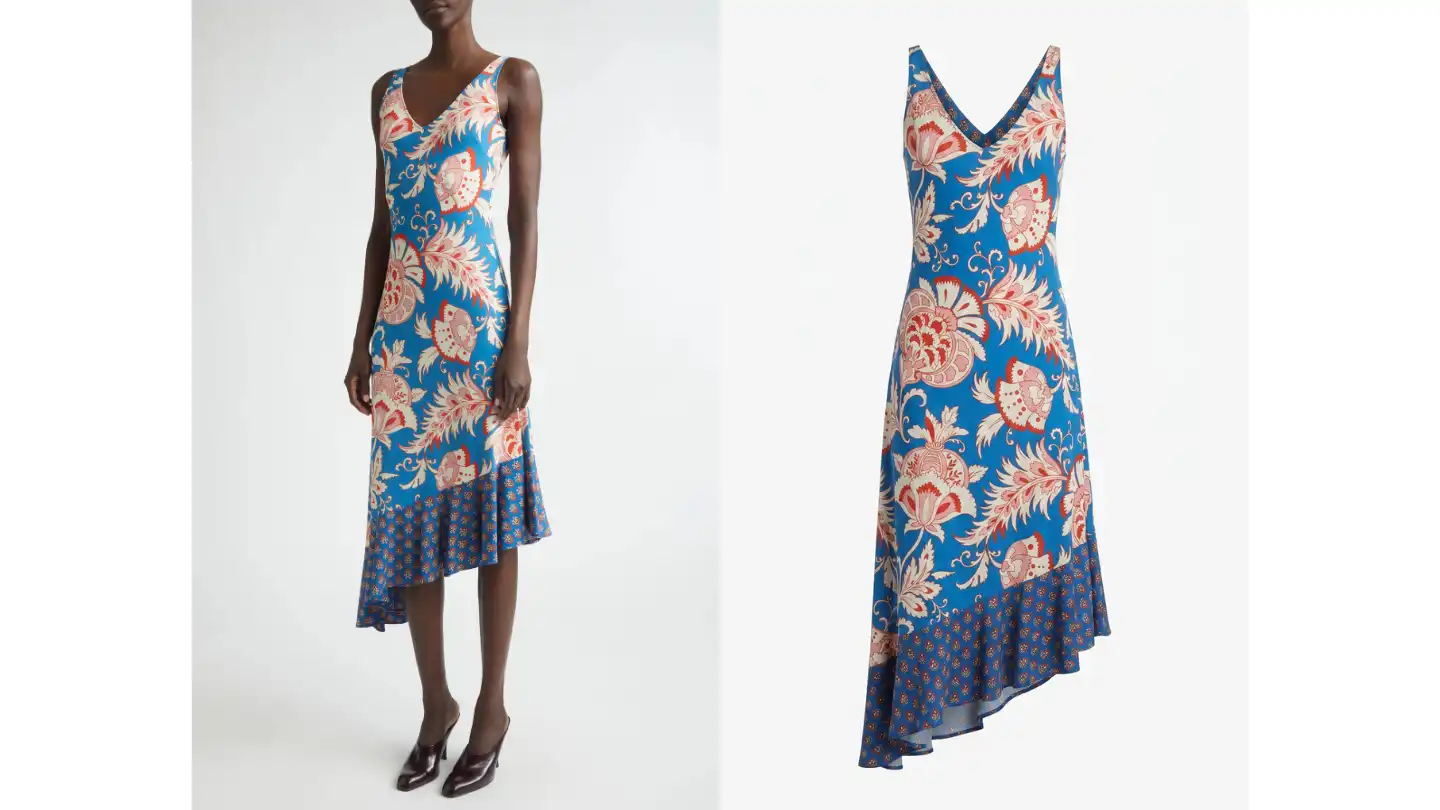
Open any well-run fashion store on Shopify, Amazon, or Zalando and one specific style of product photo shows up over and over: a garment floating on an invisible body, holding its full three dimensional shape, with no model, hanger, or mannequin in sight. That's a ghost mannequin photo, and for years it has been the default for category pages, marketplace listings, and lookbooks where the focus has to be the product itself.
The reason it dominates is simple. A flat lay flattens the garment and hides the cut. A hanger shot leaves the shoulders sagging and the neckline collapsed. A model photo distracts from the product and limits how often you can reuse the image across categories. The ghost mannequin look sits in the middle: it shows the true silhouette of the garment, on a clean background, in a way that works at thumbnail size and at full screen.
The catch has always been the production cost. Done the traditional way, ghost mannequin photography needs a real mannequin, a photographer, careful styling, and a Photoshop editor to remove the mannequin and composite the inside of the garment back in. In 2026, AI tools can produce the same result from a single hanger or flat lay photo in under a minute. This guide explains how the technique actually works, what each approach costs, and how to decide which one belongs in your workflow.
Ghost mannequin photography, sometimes called invisible mannequin or hollow man photography, is a product image that shows a piece of clothing with its three dimensional shape preserved but with the body that gave it that shape removed. The garment looks like it's being worn by an invisible person.
In a traditional studio, this is built from at least two photographs. The first shot is the garment on a mannequin from the front. The second shot is the inside of the garment, usually the back of the neckline and the inner collar, photographed flat or on a smaller fill mannequin. An editor then masks out the mannequin in the first image and composites the inner neck detail from the second image into the cavity. The result is a garment with depth, structure, and a visible interior, with nothing holding it up.
It works because of how shoppers read product images. A flat lay is fine for small accessories, but for clothing buyers want to see how a garment hangs, where the shoulder line falls, how the fabric drapes, and what the inside of the collar looks like. Ghost mannequin shots give all of that without the visual noise of a model or the obvious distraction of a hanger and styling clips.
Marketplaces have effectively standardised on this look for category imagery. Amazon's clothing guidelines, Zalando's vendor specs, and most boutique multi brand retailers prefer a clean white background with the garment on display in its natural shape. Ghost mannequin shots clear those bars cleanly, which is why even brands that shoot full editorial campaigns still produce a ghost mannequin set for every SKU.
Ghost mannequin photography is not the right answer for every product. It earns its place in some specific situations.
Use ghost mannequin shots when:
Skip the ghost mannequin look when:
Most brands end up with a mixed library: ghost mannequin shots for the primary product image, on model shots further down the gallery, and lifestyle imagery for ads and social. The ghost mannequin shot is the workhorse of that set, the one image that has to be present on every SKU.
Before getting to the AI workflow it's worth understanding the traditional process, because it explains why the look has historically been expensive and why brands batched it into long studio days.
Every garment is steamed, lint rolled, and styled on the mannequin before the camera comes out. Sleeves are arranged, hems are evened, collars are set. Bad preparation here costs hours in retouching later, so most studios spend more time on this step than on the photography itself.
The garment is shot on a colour matched mannequin (white for white backgrounds, grey for grey) under flat, even lighting. Most studios use two soft boxes at 45 degrees and a fill light from above to eliminate shadows. The aim is a clean exposure with no harsh edges where the mannequin meets the fabric.
A second photograph captures the inside of the neckline, usually by shooting the garment flipped inside out, or on a smaller mannequin that fits behind the neck opening. This is the part that gets composited back in to create the illusion of an empty interior.
The retoucher follows the step-by-step Photoshop workflow to mask the mannequin out of the main image, drop out the background, then drop the inner neckline shot in behind the collar. They clean up edges, even out lighting, and align everything to a consistent crop and resolution. A skilled editor handles ten to fifteen garments per day.
The final files get exported at marketplace specs, usually 2000 pixels on the long side as a JPEG with a pure white background. Many brands run a final batch through a smart retouch tool for consistency in white balance and sharpness across the whole catalogue.
Here is what a small to mid sized brand with 30 SKUs would typically spend on a ghost mannequin shoot, against doing the same work with an AI tool.
| Traditional ghost mannequin | AI ghost mannequin | |
|---|---|---|
| Photographer | $1,200 | Not needed |
| Studio rental | $500 | Not needed |
| Mannequin and styling | $300 | Not needed |
| Retouching (90 images, 3 angles) | $900 | Included |
| Total for 30 SKUs | ~$2,900 | $15–$60 |
| Time to first usable image | 1–2 weeks | Under a minute |
| Time to full catalogue | 5–10 days | 1–2 hours |
The two numbers worth paying attention to are the time to the first usable image and the time to the full catalogue. Traditional shoots are batched because the fixed cost of setting up the studio only pays off across many SKUs at once. That's why brands run quarterly shoots and why new products often wait six to ten weeks for proper imagery before going live. AI inverts that economic, every product can have a finished ghost mannequin shot the same day it arrives in the warehouse.
There's also a hidden cost in the traditional workflow that doesn't show up on the invoice: re shoots. If a garment changes colour mid season, if a sample arrives looking different from the production run, or if you simply decide the original styling didn't land, you're back at the studio with the same fixed cost, something a full breakdown of what each service option costs makes clear. With an AI workflow, regenerating a single SKU costs cents and takes a minute.
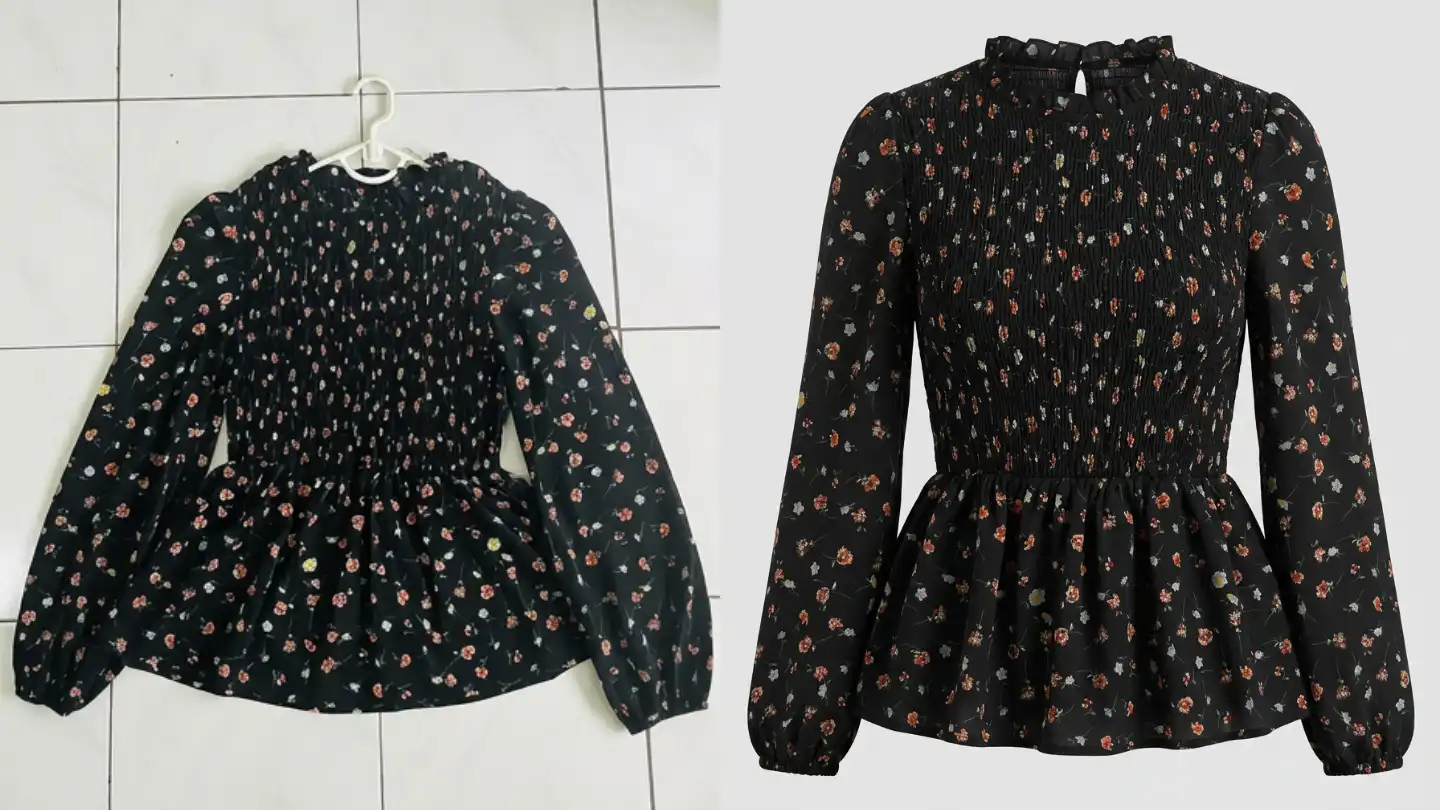
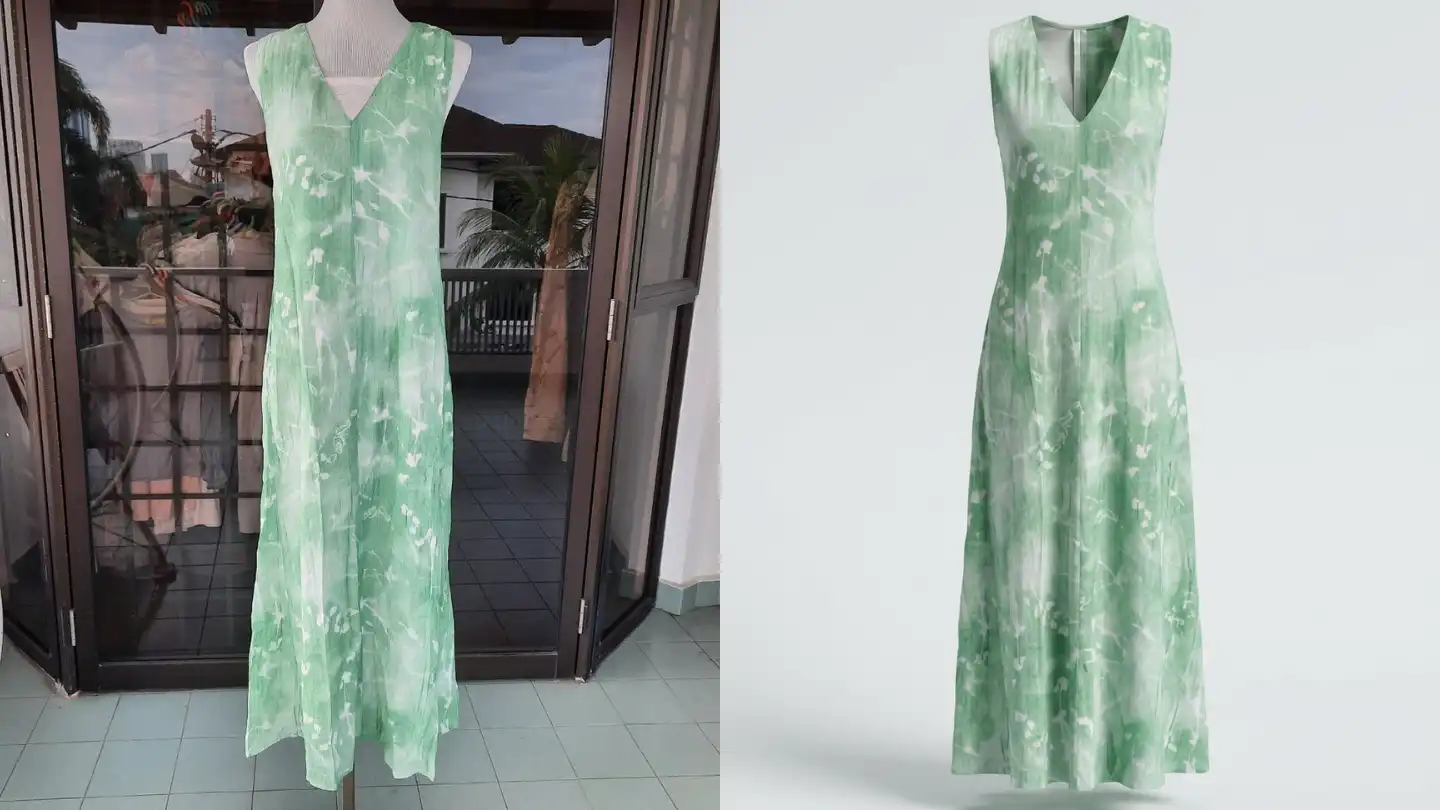
AI workflow collapses the traditional five steps into one. You upload a single source photo, usually a hanger shot or a flat lay, and the AI produces a ghost mannequin image with the garment in its natural shape, the inner neckline filled in, and a clean white background.
Under the hood, the model does three things at once. It segments the garment from whatever's holding it up (your hanger, your mannequin, the table). It infers the three dimensional shape the garment would take on a body, based on how it's cut and how the fabric drapes. And it inpaints any missing detail like the inside of the collar or cuff, drawing on what it has learned about how that style of garment is constructed.
The output is the same kind of file you'd get from a studio: a high resolution image with the garment floating against a white background, ready to drop straight into a Shopify product page or an Amazon listing. You can try the workflow on your own product photo in a browser without installing anything.
AI tools are sensitive to the source image in the same way a traditional studio is sensitive to garment preparation. A clean, well lit hanger shot taken in daylight will produce a clean ghost mannequin output. A wrinkled, dimly lit flat lay will produce a wrinkled, dimly lit ghost mannequin. Steam your garments, find a window, and use a plain background. Five extra minutes on the input saves a lot of disappointment with the output.
The single most useful upgrade you can make to your input photos is light. Even direct window light at midday is better than a ceiling lamp. If you're shooting indoors, a cheap LED panel or a white sheet to bounce light off is enough. The AI cannot invent detail that wasn't visible in the original photo, so every shadow you eliminate at the source gives the model more to work with.
AI handles these well:
AI struggles with these:
For the categories the AI struggles with, the practical answer is usually a hybrid workflow. Use AI model photography to handle the 80 percent of your catalogue it does well, then send the difficult pieces to a traditional shoot or to a retoucher who specialises in that fabric type. Trying to force every garment through one workflow tends to produce a few weak images that drag down the perception of the whole category.
Upload a hanger or mannequin photo. Get a clean ghost mannequin image in under a minute.
Try Ghost Mannequin Free →If you're starting from zero, here is the workflow that has worked for the small brands we work with. It assumes you have around twenty to fifty SKUs live on Shopify, no existing ghost mannequin shots, and only a phone camera.
Walk through your live product pages and tag each one as good, acceptable, or weak. Your weakest pages are usually the ones with hanger shots or harshly lit flat lays. Those are the ones that benefit most from a ghost mannequin upgrade. Don't try to redo your entire catalogue in one pass, the audit gives you a priority order.
For each priority SKU, take a single clean hanger shot. Use a clear plastic hanger, hang the garment against a plain wall in daylight, smooth out any wrinkles, and shoot straight on at chest height. Keep the framing tight enough that the garment fills most of the frame but loose enough that nothing is cut off. A modern phone in good light is enough.
Upload each photo to your AI tool and generate the ghost mannequin output. Most platforms will give you two to three variations to choose from. Pick the one with the cleanest neckline, the most natural drape, and the truest colour to your actual product. If none of the outputs are right, the source photo is usually the problem, re shoot rather than fight the AI for hours.
Use the ghost mannequin shot as the primary product image. Then build out the gallery with at least one back or side view, one detail shot, and ideally one on model image so the customer can see the garment in context. The ghost mannequin tells them what they're buying, the on model shot tells them how it's worn.
After the new images are live, watch your add to cart rate, conversion rate, and return rate on the updated SKUs over the next two to three weeks. Keep the rest of the catalogue untouched as a control. If the numbers move in your favour, roll the workflow out. If they don't, the source photos or the model selection usually need work, not the technology.
Ghost mannequin shots make ideal primary product images on Shopify because they crop cleanly into the square thumbnails Shopify uses across collection pages and search results. Pair the ghost mannequin shot with two or three secondary images: a back view, a fabric detail, and an on model shot further down the gallery. For the dimensions, formats, and file size limits themselves, see our Shopify product image requirements guide.
Amazon's clothing guidelines effectively require a ghost mannequin or model shot on a pure white background as the main image. AI generated ghost mannequin shots meet those specs as long as the output is high resolution and the background is genuinely #FFFFFF rather than a near white grey. Most platforms output to specs that pass Amazon checks straight away. For the full checklist, see Amazon apparel image requirements.
If you sell to wholesale buyers or distribute through multi brand marketplaces, ghost mannequin shots are usually the format buyers expect. They're easy to drop into linesheets and PDF catalogues without clashing with whatever else the marketplace is showing on the same page. A consistent ghost mannequin set across your range looks more professional to buyers than a mixed bag of model shots taken at different times.
For email and paid social, ghost mannequin shots are usually the wrong choice on their own, they read as too clinical against the lifestyle content people are scrolling past. Use them as the inset product image inside a larger lifestyle composition, or pair them with an on model shot in a two image layout. Chat to edit tools can drop a ghost mannequin output onto a coloured background or compose it with other product images for a campaign banner without going back to the source.
A handful of mistakes show up over and over when brands first move to an AI ghost mannequin workflow. Most are easy to fix once you know to look for them.
Mistake 1: Treating the source photo as throwaway.
Brands that get poor outputs from AI tools almost always have poor inputs. A blurry, badly lit phone snap will produce a blurry, badly lit ghost mannequin shot. Treat the input photo with the same care you'd give a real shoot, steam the garment, find good light, and frame it cleanly.
Mistake 2: Ignoring the colour.
AI tools generally preserve garment colour well, but they are not colour managed in the way a calibrated studio monitor is. After your first batch, compare the output side by side with the actual garment in daylight. If there's a consistent shift, adjust your white balance at the input stage rather than trying to colour correct every output by hand.
Mistake 3: Skipping the back view.
A single front shot leaves customers guessing about the cut at the back, the length, and how the fit works from behind. Generate a back view for every SKU, even when the front is the only image you'd put on the category page. The back view lives in the product gallery and quietly reduces returns by setting a more accurate expectation.
Mistake 4: Using a different ghost mannequin style across the catalogue.
Mixing different background tones, slightly different framings, or inconsistent shadow styles across your category page is one of the fastest ways to make a small brand look unprofessional. Pick a single set of settings, your background colour, your framing, your shadow style, and use those consistently across every SKU. AI tools make this easier, not harder, because the same preset can be applied across hundreds of products.
Mistake 5: Trying to perfect the workflow before going live.
The brands that benefit most from AI ghost mannequin photography are the ones who get something workable live within a week and iterate from real customer data. The competitive edge isn't the technology, it's the speed of your feedback loop. Test, measure, and adjust monthly. That cadence is impossible with a traditional shoot and routine with AI.
AI ghost mannequin photography has reached the point where it produces marketplace ready images for the majority of fashion categories. The remaining gaps, very sheer fabrics, complex reflective materials, and unusual silhouettes, are narrowing every quarter as the underlying models improve.
By 2027, we expect almost every clothing brand on Shopify and Amazon will be using something like this for their category imagery, in the same way almost every brand now uses background removal tools that would have been a Photoshop specialist's job ten years ago. The advantage isn't in being first, it's in building the workflow into your operations early enough that you stop thinking about it. Your team should be spending their time on merchandising decisions, paid acquisition, and product development, not on Photoshop.
If you're a small brand that has been putting off a ghost mannequin shoot because of cost, this is the year to revisit the decision. The technology has caught up. The cost has come down. The only thing left is to try it on your own products and see what happens. One practical note for 2026: of the AI image formats available, ghost mannequin is the least likely to require an AI disclosure under the EU rules taking effect in August 2026, because it shows your real garment rather than a generated person or scene.
Ghost mannequin photography is a product image style where a garment is shown holding its three dimensional shape with no model, hanger, or mannequin visible. It is the standard format for clothing on marketplaces like Amazon, Zalando, and most Shopify category pages.
A traditional ghost mannequin shoot for around 30 SKUs typically costs $2,500 to $3,500 once you include studio time, photography, mannequin styling, and retouching. AI ghost mannequin tools produce comparable images for roughly $0.20 to $1 per image, with most platforms offering a free trial.
Yes. AI generated ghost mannequin photos meet Amazon and Shopify image requirements as long as the output is high resolution and the background is a true white. For Amazon main images, ensure the garment fills at least 85 percent of the frame.
A clean hanger shot or flat lay taken in daylight is enough. Steam the garment, use a plain background, and frame it so the whole product is in shot with a small margin around it. A modern smartphone in good light produces source photos that work well.
Traditional shoots are still the right call for very sheer fabrics, heavily reflective materials like sequins or metallics, and campaign hero images where the styling and art direction are part of the story. For everyday product page imagery on basics, knitwear, shirts, and outerwear, an AI workflow is usually faster and cheaper with comparable quality.
Upload a hanger or mannequin photo. Get a clean ghost mannequin image in under a minute.
Try Ghost Mannequin Free →Generate clean, professional ghost mannequin images from any garment photo in under 30 seconds.
Try it freeTurn one product image into a complete studio-grade AI model photo set.
Learn more →Place your garment on diverse AI models for realistic size and style representation.
Learn more →