Flat lay vs ghost mannequin vs on-model: what to use and when
By Snaproom · September 12, 2026 · 10 min read
A new drop can sell itself and still get held back by the wrong image format. The real question behind flat lay vs ghost mannequin vs on-model is not which one looks best on its own. It is which image answers the question a shopper is actually asking on the screen they are looking at.
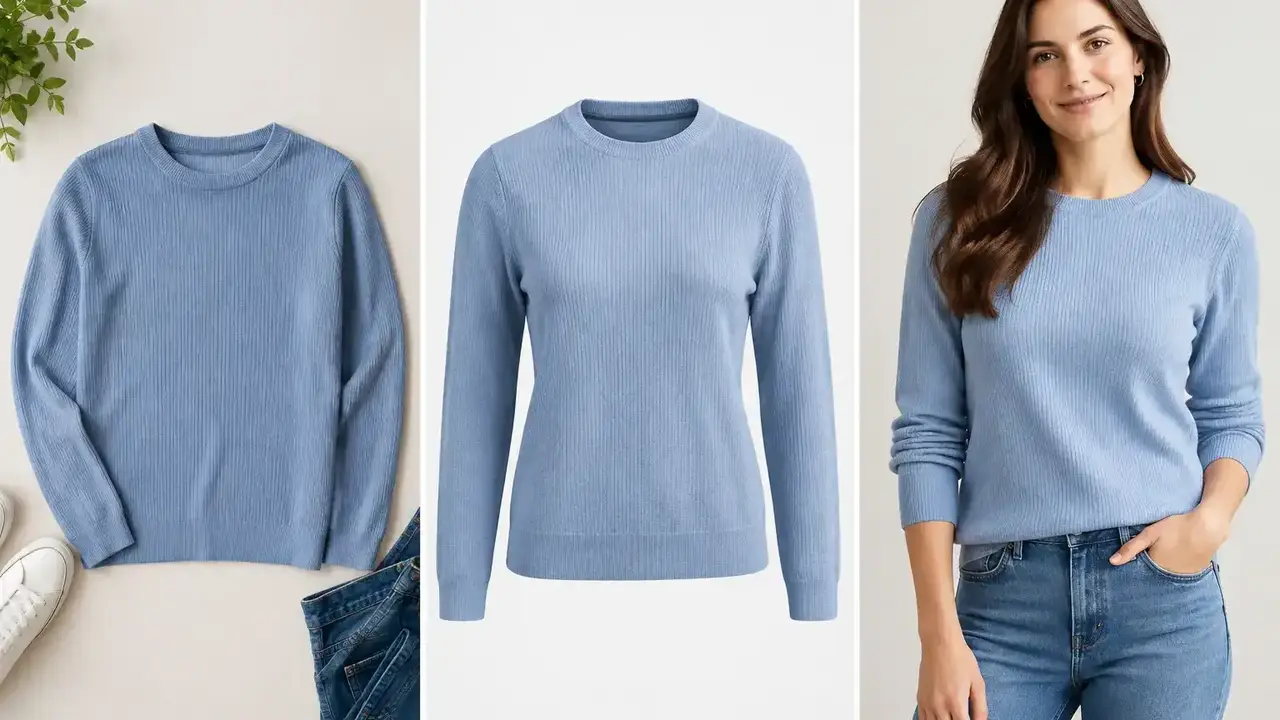
Flat lay shows detail. Ghost mannequin shows shape. On-model shows fit. Most apparel brands end up needing some mix of the three, and the mix changes by product, by channel, and by how many SKUs need images before Friday.
Flat lay is the fastest and cheapest option, best for garments that sell on detail, such as tees, scarves, and folded knitwear. Ghost mannequin gives a clean, structured view of a garment's shape without a model, and it is required as the main image for most adult apparel on Amazon. On-model shows fit, drape, and movement, which matters most for fit-sensitive pieces like dresses and outerwear. Most catalogs need at least two of the three formats, not one for everything.
Flat lay places the garment on a surface and shoots from above. It's the fastest way to document inventory at volume, which is why it's common for weekly restocks, vintage and resale sellers, and large SKU counts. It's strong at showing color, stitching, hardware, labels, and print placement, exactly the things a buyer wants to verify before trusting a listing.
The limit is fit. A flat lay can't show shoulder width, garment length on a body, stretch, or how fabric moves, and it tends to flatten structured pieces like puffers and tailored coats. Treat it as a detail asset and a fast source photo, not a complete product page on its own.
Ghost mannequin photography shoots the garment on a mannequin, then removes the mannequin in post so the piece appears to float with a realistic 3D shape. It's the standard clean apparel look because it makes construction easy to read, collar, shoulder line, sleeve profile, without needing a live model.
It doesn't answer the fit question. It shows shape, not how that shape behaves on a body. And traditional production is genuinely involved, multiple angles, interior neckline capture, retouching. For the full production breakdown, real costs, and how AI has changed that workflow, see our complete ghost mannequin guide.
On-model photography shows scale, proportion, and how a garment actually sits on a body, sleeve length, rise, neckline depth, how it drapes. It's usually the strongest format for collection pages, paid social, and anywhere you have seconds to earn attention, and it's the only format that gives a product a point of view.
It's also the most expensive and hardest to repeat on a traditional shoot, casting, styling, scheduling, reshoots every time a colorway changes. For the full cost comparison and a step-by-step workflow, see how small brands replace photoshoots with AI model photos.
Search this comparison and you'll find specific numbers everywhere. One AI photo vendor cites a 15 to 30 percent add-to-cart lift for ghost mannequin over flat lay. A European retouching studio cites 33 to 40 percent. Another vendor credits on-model with a 20 to 30 percent lift over flat lay, sourced to "aggregated data from Shopify merchants." None of these point to a named study, a sample size, or a published methodology. They're all companies selling the format they're citing a number for.
That doesn't mean the direction is wrong. Reducing a shopper's uncertainty about fit and shape is a reasonable mechanism for fewer abandoned carts, and it matches what retailers report anecdotally. But treat any specific percentage you read, including the ones above, as directional, not something to build a revenue forecast on. The only reliable version of this test is the one your own catalog can run, same SKU, same price, same placement, different image format, enough traffic to reach significance before you call a winner.
For most adult apparel categories on Amazon, tops, dresses, pants, outerwear, the main image is required to show the garment on a live model or using the ghost mannequin technique. A flat, folded, or laid-out shot does not qualify as the main image for these subcategories, no matter how clean the background is.
| Category | Amazon main image requirement |
|---|---|
| Adult apparel (tops, dresses, pants, outerwear) | Live model or ghost mannequin. Flat lay not accepted. |
| Children's and baby clothing | Flat lay generally preferred. Live models often restricted. |
| Accessories, socks | Flat lay typically accepted. |
| Multi-pack apparel | Flat, off-model. |
| Footwear | Single shoe, facing left, at a 45-degree angle. |
Always confirm against the specific style guide for your subcategory in Seller Central, Amazon updates these without much notice. Shopify and most DTC sites don't enforce anything like this, which is exactly why it gets missed. A brand building one gallery for both channels can end up with a suppressed Amazon listing because the hero image that worked fine on Shopify is a flat lay. Check compliance per channel before you lock a hero format. For the Shopify-side dimensions and format spec, see Shopify's clothing image requirements. For the full checklist, see Amazon apparel image requirements. For Etsy's photo count and resolution rules, see Etsy product photo requirements.
A structured blazer needs to prove shape, lead with ghost mannequin. An oversized hoodie needs to prove scale, lead with on-model. A printed scarf needs to prove detail, lead with flat lay. A fitted dress needs to prove drape and length, lead with on-model and back it with ghost mannequin as the compliant fallback.
The format should reduce a specific uncertainty for that product, not fill a gallery slot because it's the format you already know how to shoot.
A practical gallery doesn't need a full shoot per format. It needs a channel-compliant hero, one shape or fit image, and one detail image. This is where the traditional tradeoff, pick one format, shoot it, live with it, has actually shifted. Snaproom takes a source photo you already have, flat lay, hanger, or mannequin shot, and generates ghost mannequin and on-model outputs from it, so the three-format decision stops requiring three separate shoots.
If you're publishing AI-generated model photos, check what disclosure applies to your listing, requirements changed under the EU AI Act in August 2026. See what the EU AI Act actually requires for AI product photos.
Capture one accurate source image in even lighting, true to color, texture, and construction, since every asset downstream depends on it. Decide what the product needs to prove and generate the matching format. Format the output for where it's actually going, marketplace main image, PDP gallery, vertical social. Treat this as listing infrastructure, not a one-time campaign, every new colorway and restock should follow the same repeatable path.
Only for specific categories, kids and baby clothing, accessories, socks, and multi-packs. For adult apparel like tops, dresses, and outerwear, Amazon requires a live model or ghost mannequin main image.
There's no publicly sourced number worth trusting, the figures circulating online range from 15 to 40 percent and none cite a study. Run your own A/B test on your top SKUs rather than relying on a vendor's cited benchmark.
Yes. AI tools including Snaproom can generate ghost mannequin and on-model outputs from a flat lay, hanger, or mannequin source photo without a new shoot.
Flat lay, by a wide margin, which is why it remains the default for weekly restocks and large SKU catalogs even where it isn't the strongest converting format.
No. A simple product may only need a compliant hero and one detail shot. Denim, outerwear, and fit-sensitive categories usually need more proof before a shopper commits.
Only for specific categories, kids and baby clothing, accessories, socks, and multi-packs. For adult apparel like tops, dresses, and outerwear, Amazon requires a live model or ghost mannequin main image.
There's no publicly sourced number worth trusting, the figures circulating online range from 15 to 40 percent and none cite a study. Run your own A/B test on your top SKUs rather than relying on a vendor's cited benchmark.
Yes. AI tools including Snaproom can generate ghost mannequin and on-model outputs from a flat lay, hanger, or mannequin source photo without a new shoot.
Flat lay, by a wide margin, which is why it remains the default for weekly restocks and large SKU catalogs even where it isn't the strongest converting format.
No. A simple product may only need a compliant hero and one detail shot. Denim, outerwear, and fit-sensitive categories usually need more proof before a shopper commits.
Turn a flat lay or hanger photo into a clean ghost mannequin product image.
Try it freeTurn one clothing photo into a complete studio-grade AI model photo set.
Try it freePlace your garment on diverse AI models for realistic size and style representation.
Try it free